Input validation and error responses in ASP.NET

Input data validation is an essential part of software development. The ASP.NET framework provides a set of features that help developers ensure that APIs only process data whose values meet the application’s rules. This post discusses the validation features of ASP.NET and the format of the error messages returned. It covers invalid type errors and model validation using the ASP.NET DataAnnotations feature. In addition, it shows how to customize the response format. The code examples were developed using version 5 of ASP.NET and are available on github.
Model Binding errors
Model binding is the ASP.NET feature that acts on HTTP requests, converting the input data from the routes into .NET types.
The Model Binding step is executed during the filter pipeline. More specifically, this step runs before the action filters, which in turn run before and after the execution of the controller methods.
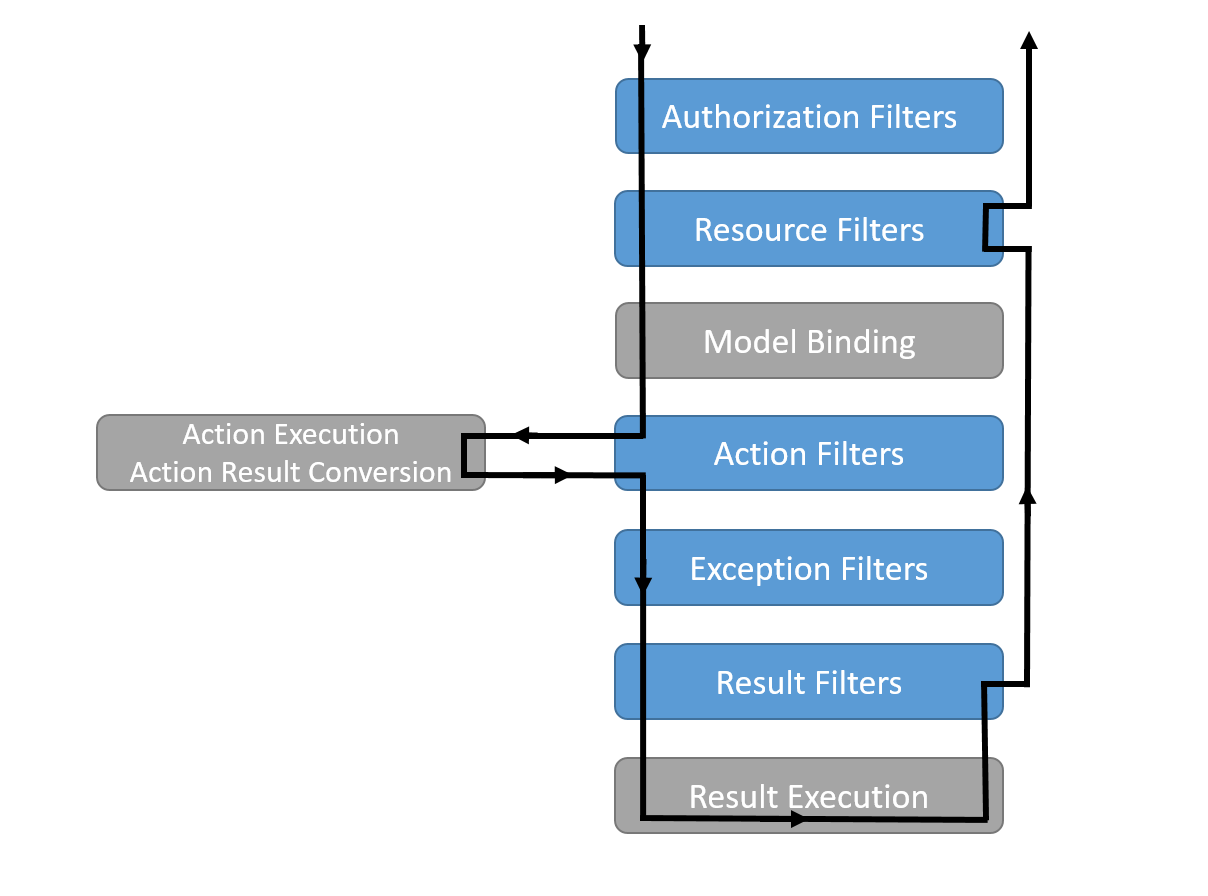
Consider the example Controller:
[Route("[controller]")]
public class ExampleController : ControllerBase
{
    [HttpGet]
    public ActionResult Get(int id)
    {
        if (id == 1)
            return Ok(new ExampleRequest{Name = "Example1"});

        return NotFound();
    }
}
When a request is made to this route, ASP.NET will examine the request to find the id field, which in this case is sent as a parameter. Then, the found value will be converted to an integer and the Get method will be executed. But what happens if the value passed is text? The data is not converted and is filled with the default value, which for an integer is 0. If it were an object, the default value would be null, which could cause a NullReferenceException if no check were made.
ModelState
The ModelState property of the ControllerBase class contains the state of the model and model binding validation. When the input data cannot be converted, the ModelState is invalid. So it is possible to check whether the input data is correct with respect to the expected types.
[Route("[controller]")]
public class ExampleController : ControllerBase
{
    [HttpGet]
    public ActionResult Get(int id)
    {
        if (!ModelState.IsValid)
            return BadRequest(ModelState);

        if (id == 1)
            return Ok(new ExampleRequest{Name = "Example1"});

        return NotFound();
    }
}
This way, if this route is called sending the value “text” in the id field, we get the following error:
{
    "id": [
        "The value 'texto' is not valid."
    ]
}
This prevents the application from processing requests with invalid data. But if my application has several controllers, do I need to repeat this check in all of them?
[ApiController]
The ASP.NET attribute ApiControllerAttribute can be applied to Controllers and brings some features. Among them, it performs automatic validation of input data and returns a 400 error similarly to the ModelState check. Changing the example Controller:
[ApiController]
[Route("[controller]")]
public class ExampleController : ControllerBase
{
    [HttpGet]
    public ActionResult Get(int id)
    {
        if (id == 1)
            return Ok(new ExampleRequest{Name = "Example1"});

        return NotFound();
    }
}
And when making the request with the invalid value we get the same error as when using the ModelState check. This happens because the ModelStateInvalidFilter filter is added to all Controllers annotated with ApiControllerAttribute.
In addition to the ModelState validation, ApiControllerAttribute brings other error information in its result:
{
    "type": "https://tools.ietf.org/html/rfc7231#section-6.5.1",
    "title": "One or more validation errors occurred.",
    "status": 400,
    "traceId": "00-a89db4d9a02dfc479c4d50b401f60fb5-28ba31ad1392154c-00",
    "errors": {
        "id": [
            "The value 'texto' is not valid."
        ]
    }
}
By default the attribute responds with the format above containing:
- type: the RFC link that determines the HTTP response types, specifically for the 400 error section;
- status: the error status code;
- traceId: the request’s traceId. By default, ASP.NET 5 uses the format defined by the W3C recommendation. You can find more information about traceId and trace context here;
- errors: a list of errors containing the model validation error.
It is also possible to decorate the assembly with ApiControllerAttribute. This can be done by decorating the namespace declaration that contains the Startup class. This way, the behavior of ApiControllerAttribute will be applied to all controllers in the assembly.
[assembly: ApiController]
namespace WebApiSample
{
    public class Startup
    {
        ...
    }
}
Model validation
Validating data types is important, but usually we want to apply other validations to our input data. For example, we can mark fields as required, set a minimum or maximum length, and apply more complex rules. It is important to guarantee that our application will only process valid data. This also prevents the application code from having a bunch of ifs and elses that end up polluting the code. See the example below:
[HttpPost]
public ActionResult Add(ExampleRequest example)
{
    return Ok();
}
...
public class ExampleRequest
{
    [Required]
    public string Name { get; set; }
}
The example uses the Required attribute present in the System.ComponentModel.DataAnnotations namespace.
Making a request to the new POST route with an empty body gives us the error:
{
    "type": "https://tools.ietf.org/html/rfc7231#section-6.5.1",
    "title": "One or more validation errors occurred.",
    "status": 400,
    "traceId": "00-421e7740cdb1394aba958b549d319bc2-ffc80b3fe2883349-00",
    "errors": {
        "Name": [
            "The Name field is required."
        ]
    }
}
There are many other attributes (the complete list can be seen here) and it is also possible to extend this feature by creating custom attributes that inherit from the ValidationAttribute class, as shown in the example:
public class ExampleRequest
{
    [Required]
    public string Name { get; set; }
    [StringLength(1000)]
    public string Description { get; set; }
    [Range(1, 100)]
    public int SomeValue { get; set; }
    [EmailAddress]
    public string Email { get; set; }
    [IsEven]
    public int EvenNumber { get; set; }
}

public class IsEvenAttribute : ValidationAttribute
{
    public IsEvenAttribute() : base ("Value is not an even number")
    {
    }

    public override bool IsValid(object value)
    {
        var intValue = Convert.ToInt32(value);
        return intValue % 2 == 0;
    }
}
The same effect can be achieved using FluentValidation by configuring its ASP.NET integration.
Customizing the error response
For some cases the default error response that ApiControllerAttribute sends may be inadequate for the application. For example, the status and type fields are redundant considering that the HTTP response code is already returned with the request. In addition, if the application returns other types of 400 errors, it may be necessary to include new fields in the response.
For that, ASP.NET has a feature that allows changing the response format. You should use the ApiBehaviorOptions class to change the behavior of all Controllers annotated with ApiControllerAttribute. This configuration must be made in the ConfigureServices method of the application’s Startup class. The ConfigureApiBehaviorOptions method must be called, filling the InvalidModelStateResponseFactory property with the response customization.
See the example below:
services.AddControllers()
    .ConfigureApiBehaviorOptions(options =>
    {
        options.InvalidModelStateResponseFactory = context =>
        {
            var response = new
            {
                Error = new Dictionary<string, string[]>(),
                Type = "VALIDATION_ERRORS"
            };
            foreach (var (key, value) in context.ModelState)
                response.Error.Add(key, value.Errors.Select(e => e.ErrorMessage).ToArray());

            return new BadRequestObjectResult(response);
        };
    });
The code above simplifies the API’s response, bringing only the list of errors and a new field indicating that the error reason is data validation. Making the problematic request again, we get the error:
{
    "error": {
        "Name": [
            "The Name field is required."
        ]
    },
    "type": "VALIDATION_ERRORS"
}
It is important to note that only validation errors — that is, when the ModelState is invalid — are affected by this customization.
Conclusion
ASP.NET has features that help developers create more robust APIs by applying input data validation. In addition, there are great libraries like FluentValidation that allow more freedom to create smarter model validators. Using the ApiController attribute of ASP.NET enhances APIs by adding features such as the automatic 400 response for standard validation errors. However, if desired, it is possible to customize the result in a simple way using InvalidModelStateResponseFactory.
Thanks for making it this far and I hope you enjoyed it. Questions, suggestions, or found an error? Please leave a comment.