SaveChanges and transaction control in EF Core
The SaveChanges method is responsible for saving all changes to the database when working with Entity Framework Core. When executing this method, by default, we are executing the operations inside a transaction. The documentation says:
By default, if the database provider supports transactions, all changes in a single call to SaveChanges are applied in a transaction. If any of the changes fail, then the transaction is rolled back and no changes are applied to the database.
This post covers how the SaveChanges method works by analyzing EF Core logs and the generated queries. The focus of the analysis is transaction control. The library version used in the tests is 5 and the database used in the analysis is Microsoft SQL Server. The results found may be different in other versions and/or using other databases. The code created for the tests can be seen here.
Configuring the DbContext
The database context must be configured to obtain the information needed to understand EF Core.
protected override void OnConfiguring(DbContextOptionsBuilder optionsBuilder)
{
    optionsBuilder
        .UseSqlServer(
            "Data Source=localhost,1433;Initial Catalog=Timesheet;User Id=sa;Password=Password1")
        .LogTo(message => Debug.WriteLine(message));
}
The LogTo method used in the configuration is the new way to access EF Core logs. The Simple Logging feature was introduced in version 5 of the ORM and allows directing log entries to the desired output type. In the example, the data is directed to the Visual Studio Debug window using the Debug.Writeline method. In older versions it is possible to get the logs using the UseLoggerFactory method.
Adding data with SaveChanges
To verify how SaveChanges works, a simple test was written adding two objects to the database. Two rows will be stored in the database, one in each table.
var employee = new Employee
{
    Name = "John Doe",
    Entries = new List<TimeEntry>
    {
        new TimeEntry
        {
            Start = TimeSpan.FromHours(8),
            End = TimeSpan.FromHours(12)
        }
    }
};
context.Add(employee);

context.SaveChanges();
It is possible to see in the generated log that the first steps of EF Core when executing the SaveChanges method are verifying the changes of the context’s entities. Right after that, the database connection is opened.
dbug: CoreEventId.SaveChangesStarting[10004] (Microsoft.EntityFrameworkCore.Update)
      SaveChanges starting for 'TestContext'.
dbug: CoreEventId.DetectChangesStarting[10800] (Microsoft.EntityFrameworkCore.ChangeTracking)
      DetectChanges starting for 'TestContext'.
dbug: CoreEventId.DetectChangesCompleted[10801] (Microsoft.EntityFrameworkCore.ChangeTracking)
      DetectChanges completed for 'TestContext'.
dbug: RelationalEventId.ConnectionOpening[20000] (Microsoft.EntityFrameworkCore.Database.Connection)
      Opening connection to database 'Timesheet' on server 'localhost,1433'.
dbug: RelationalEventId.ConnectionOpened[20001] (Microsoft.EntityFrameworkCore.Database.Connection)
      Opened connection to database 'Timesheet' on server 'localhost,1433'.
The following log entries are related to the transaction. At first, the transaction is started with the isolation level unspecified. The next message shows that the transaction was initialized with the ReadCommitted level, which is the SQL Server default.
dbug: RelationalEventId.TransactionStarting[20209] (Microsoft.EntityFrameworkCore.Database.Transaction)
      Beginning transaction with isolation level 'Unspecified'.
dbug: RelationalEventId.TransactionStarted[20200] (Microsoft.EntityFrameworkCore.Database.Transaction)
      Began transaction with isolation level 'ReadCommitted'.
Then two INSERT commands are executed, one for each entity. Since the entities’ Ids are generated by the database, you can see that for each INSERT a SELECT was also performed so that EF Core obtains the Id of the inserted entity. Some logs about command creation and foreign key change detection were omitted.
dbug: RelationalEventId.CommandExecuting[20100] (Microsoft.EntityFrameworkCore.Database.Command)
      Executing DbCommand [Parameters=[@p0='John Doe' (Size = 4000)], CommandType='Text', CommandTimeout='30']
      SET NOCOUNT ON;
      INSERT INTO [Employees] ([Name])
      VALUES (@p0);
      SELECT [Id]
      FROM [Employees]
      WHERE @@ROWCOUNT = 1 AND [Id] = scope_identity();

dbug: RelationalEventId.CommandExecuting[20100] (Microsoft.EntityFrameworkCore.Database.Command)
      Executing DbCommand [Parameters=[@p1='3' (Nullable = true), @p2='12:00:00', @p3='08:00:00'], CommandType='Text', CommandTimeout='30']
      SET NOCOUNT ON;
      INSERT INTO [TimeEntries] ([EmployeeId], [End], [Start])
      VALUES (@p1, @p2, @p3);
      SELECT [Id]
      FROM [TimeEntries]
      WHERE @@ROWCOUNT = 1 AND [Id] = scope_identity();
Finally, the transaction is committed.
dbug: RelationalEventId.TransactionCommitting[20210] (Microsoft.EntityFrameworkCore.Database.Transaction)
      Committing transaction.
dbug: RelationalEventId.TransactionCommitted[20202] (Microsoft.EntityFrameworkCore.Database.Transaction)
      Committed transaction.
Controlling the transaction
For most cases, using SaveChanges is enough to guarantee data consistency. However, when necessary, it is possible to control transactions manually.
The second test uses the same example as the first one. This time the SaveChanges method is being executed inside a transaction started with the BeginTransaction method.
var employee = new Employee
{
      Name = "John Doe",
      Entries = new List<TimeEntry>
      {
            new TimeEntry
            {
                  Start = TimeSpan.FromHours(8),
                  End = TimeSpan.FromHours(12)
            }
      }
};
context.Add(employee);

using var transaction = context.Database.BeginTransaction();

context.SaveChanges();

transaction.Commit();
The first log entries are about opening the transaction. As in the first test, the transaction is started with the isolation level unspecified and created with the ReadCommited level.
dbug: RelationalEventId.TransactionStarting[20209] (Microsoft.EntityFrameworkCore.Database.Transaction)
      Beginning transaction with isolation level 'Unspecified'.
dbug: RelationalEventId.TransactionStarted[20200] (Microsoft.EntityFrameworkCore.Database.Transaction)
      Began transaction with isolation level 'ReadCommitted'.
When executing the SaveChanges method, EF Core creates a savepoint of the transaction instead of opening a nested transaction. The entity change detection logs were omitted.
dbug: CoreEventId.SaveChangesStarting[10004] (Microsoft.EntityFrameworkCore.Update)
      SaveChanges starting for 'TestContext'.

dbug: RelationalEventId.CreatingTransactionSavepoint[20212] (Microsoft.EntityFrameworkCore.Database.Transaction)
      Creating transaction savepoint.
dbug: RelationalEventId.CreatedTransactionSavepoint[20213] (Microsoft.EntityFrameworkCore.Database.Transaction)
      Created transaction savepoint.
Then the commands are executed in the same way as in the first test.
dbug: RelationalEventId.CommandExecuting[20100] (Microsoft.EntityFrameworkCore.Database.Command)
      Executing DbCommand [Parameters=[@p0='John Doe' (Size = 4000)], CommandType='Text', CommandTimeout='30']
      SET NOCOUNT ON;
      INSERT INTO [Employees] ([Name])
      VALUES (@p0);
      SELECT [Id]
      FROM [Employees]
      WHERE @@ROWCOUNT = 1 AND [Id] = scope_identity();

dbug: RelationalEventId.CommandExecuting[20100] (Microsoft.EntityFrameworkCore.Database.Command)
      Executing DbCommand [Parameters=[@p1='5' (Nullable = true), @p2='12:00:00', @p3='08:00:00'], CommandType='Text', CommandTimeout='30']
      SET NOCOUNT ON;
      INSERT INTO [TimeEntries] ([EmployeeId], [End], [Start])
      VALUES (@p1, @p2, @p3);
      SELECT [Id]
      FROM [TimeEntries]
      WHERE @@ROWCOUNT = 1 AND [Id] = scope_identity();
Finally, when executing the transaction.Commit() method, the changes are confirmed.
dbug: RelationalEventId.TransactionCommitting[20210] (Microsoft.EntityFrameworkCore.Database.Transaction)
      Committing transaction.
dbug: RelationalEventId.TransactionCommitted[20202] (Microsoft.EntityFrameworkCore.Database.Transaction)
      Committed transaction.
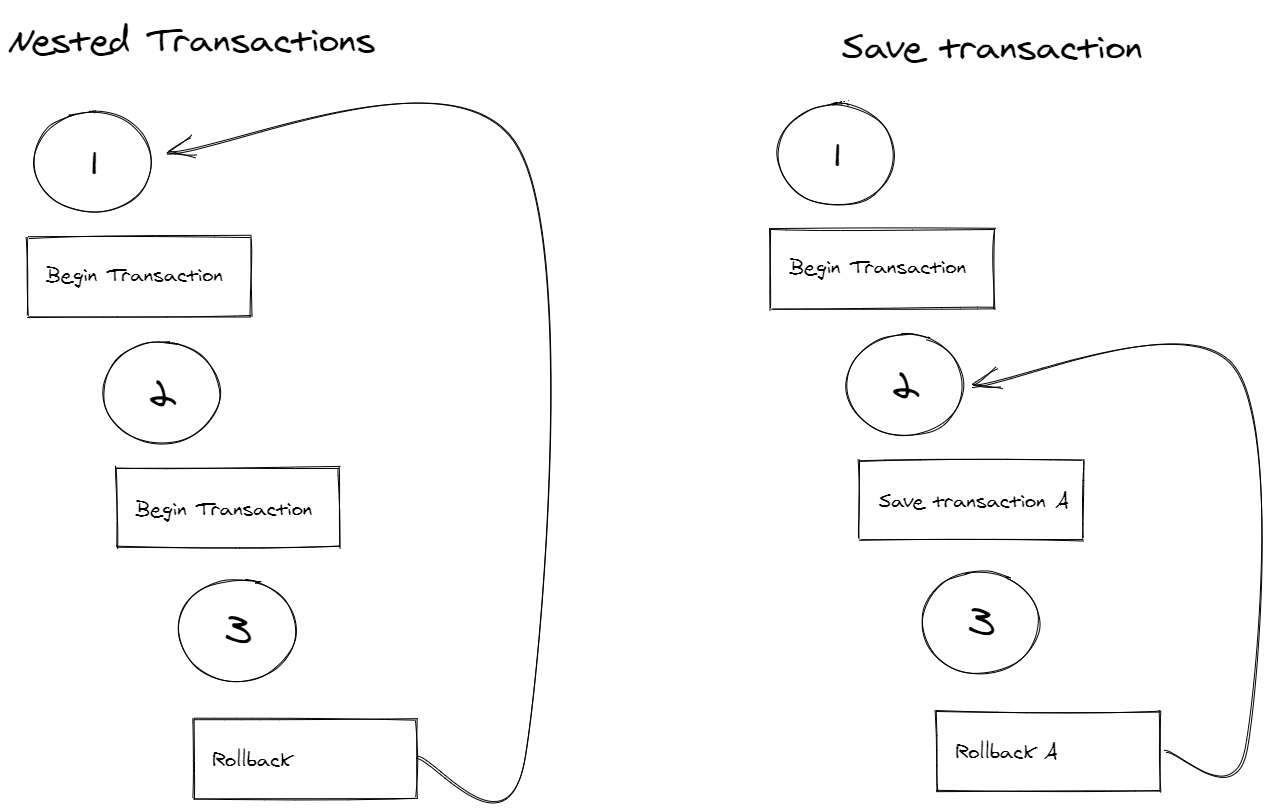
The difference between nested transactions and savepoints in SQL Server
In SQL Server, using nested transactions has a behavior that can confuse developers. ROLLBACK reverts all open transactions of the session. It does not matter whether nested transactions exist: ROLLBACK will undo all operations performed since the first BEGIN TRANSACTION.
SAVE TRANSACTION, on the other hand, places a tag at the desired point of the transaction so that it is possible to execute ROLLBACK and revert the changes back to that point. It is possible to create several savepoints in the same transaction. It is important to remember that SAVE TRANSACTION does not open a new transaction.
Savepoints in EF Core
EF Core also allows the manual creation of savepoints using the CreateSavepoint method.
using var transaction = context.Database.BeginTransaction();

context.Add(new Employee { Name = "John Doe" });
context.SaveChanges();

transaction.CreateSavepoint("A");

context.Add(new Employee { Name = "Jane Doe" });
context.SaveChanges();

transaction.Commit();
Previous versions
The savepoint feature was included in EF Core 5. In versions 3.1 and 2.1, EF Core — in addition to not allowing the manual creation of savepoints — also does not execute a SAVE TRANSACTION during the execution of the SaveChanges method. That is, if a transaction is already open, as in the second test, SaveChanges just executes the database change commands.
Conclusion
The SaveChanges method makes the developer’s life easier by executing the database change commands inside a transaction. For the other cases, where a transaction is opened manually, SaveChanges only creates a savepoint inside the transaction.
References
- Simple Logging - https://docs.microsoft.com/en-us/ef/core/logging-events-diagnostics/simple-logging
- Using transactions - https://docs.microsoft.com/en-us/ef/core/saving/transactions
- Transaction Locking and Row Versioning Guide - https://docs.microsoft.com/en-us/sql/relational-databases/sql-server-transaction-locking-and-row-versioning-guide?view=sql-server-ver15
- Nesting transactions and SAVE TRANSACTION command - https://dba-presents.com/index.php/databases/sql-server/43-nesting-transactions-and-save-transaction-command
- SAVE TRANSACTION - https://docs.microsoft.com/en-us/sql/t-sql/language-elements/save-transaction-transact-sql?view=sql-server-ver15
- https://github.com/dotnet/efcore/blob/release/5.0/src/EFCore.Relational/Update/Internal/BatchExecutor.cs#L89
- https://github.com/dotnet/efcore/blob/release/2.1/src/EFCore.Relational/Update/Internal/BatchExecutor.cs#L70